
1. Introduction
When deploying Elastic integrations in Kubernetes environments, teams usually follow established procedures that work reliably across most setups. However, OpenShift-managed Kubernetes clusters present unique key endpoint changes that can catch administrators off guard.
OpenShift’s approach to networking and security differs significantly from standard Kubernetes deployments. The platform enforces stricter security policies and implements its own service mesh and routing mechanisms. These differences mean that standard Elastic integration configurations often fail to connect properly, leaving teams troubleshooting connectivity issues that wouldn’t occur in vanilla Kubernetes.
The most critical issue involves endpoint configuration. Services that communicate seamlessly in standard Kubernetes may struggle to reach each other in OpenShift due to route restrictions and modified DNS resolution patterns. Network policies that work elsewhere might block essential traffic flows, and the default security contexts can prevent containers from accessing required resources.
This guide examines these OpenShift-specific networking challenges and provides practical solutions for endpoint configuration.
2. Overview of Kubernetes
Kubernetes is an open-source container orchestration platform designed to simplify the management of complex, containerized applications. It handles tasks such as automated deployment, scaling, and lifecycle management, allowing applications to remain resilient and adaptable under changing workloads. By abstracting the underlying infrastructure, Kubernetes provides developers and operators with a consistent way to run applications across different environments whether on-premises, in the cloud, or in hybrid setups. Its built-in capabilities, such as service discovery, load balancing, self-healing, and automated roll outs or rollbacks, make it a powerful foundation for building reliable and scalable systems.
3. What is OpenShift?
OpenShift is a Kubernetes-based container platform that extends the core capabilities of Kubernetes with additional features tailored for enterprise use. It provides a secure, opinionated environment that simplifies application deployment while addressing operational challenges such as authentication, authorization, and compliance. With built-in tools for monitoring, logging, and developer productivity, OpenShift streamlines the process of building, deploying, and managing applications at scale. One of its defining strengths is the integrated approach to networking and service exposure, which differs from upstream Kubernetes and often requires specific configuration adjustments. By offering a more complete platform out of the box, OpenShift enables organizations to focus less on managing infrastructure details and more on delivering reliable, production-grade workloads..
4. Endpoint Changes in OpenShift
OpenShift uses a networking and security model distinct from standard Kubernetes, affecting how services are exposed and accessed. To keep Elastic components communicating smoothly, endpoint adjustments are needed at three levels.
4.1 Cluster-Level Endpoint Changes
At the cluster level, adjustments ensure consistent service discovery and communication across the entire environment. This makes Elastic services accessible beyond individual namespaces or pods, providing a unified way for components to interact within the cluster.
There are two main types of cluster-level metrics:
- kube-apiserver :– Provides metrics related to the Kubernetes API server, such as request rates, latencies, and error counts.
- kube-state-metrics :– Captures the state of containers across the cluster, including restarts, resource allocation, and health status.
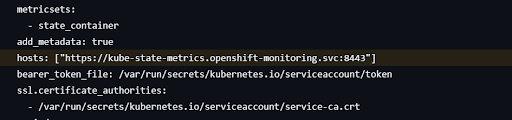
1. Change hosts from “Kube-state-metrics:8080” to “https://Kube-state-metrics.open-shift-monitoring.svc:8443” and you should also give your ca.,crt path because of HTTPS.
4.2. Elastic Agent Leader Election Concept
In cluster-level there is also a condition of Elastic Agent Leader Election. When an Elastic Agent is deployed as a DaemonSet, each node runs an agent instance. Node-level data (like logs and container metrics) should be collected by all agents, but cluster-level data (Kube-state-metrics , kube-apiserver) should only be gathered once to prevent duplication.
To handle this, Elastic Agent uses a leader election mechanism. One agent in the cluster is automatically chosen as the leader, and only that agent executes integrations that include the condition:
condition: ${kubernetes_leaderelection.leader} == true
Note : This condition must be applied on both cluster-level data (Kube-state-metrics , kube-apiserver).
4.3 Node-Level Endpoint Changes
At the node level, adjustments determine how requests are directed to specific nodes running Elastic workloads. This includes configuring access paths and maintaining secure connectivity while remaining compliant with OpenShift’s networking rules and restrictions.
1. Change condition for kubernetes.controller-manager
#condition: $(kubernetes.labels.component} == ‘kube-controller-manager’
condition: ${kubernetes.labels.app} == ‘kube-controller-manager’
2. Change condition for kubernetes.sheduler
#condition: $(kubernetes.labels.component} == ‘kube-scheduler’
condition: $(kubernetes.labels.app} == ‘openshift-kube-scheduler
3. Change address for kubernetes.proxy

4.4 Container-Level Endpoint Changes
1. Change container-logs path1. Change container-logs path
paths:
* Docker
-/var/log/containers/*${kubernetes.container.id}.log
#CRI-O
/var/log/pods/$(kubernetes.namespace)_${kubernetes.pod.name}_$(kubernetes.pod.uid)/$(kubernetes.container.name}/*.log
6. Conclusion
Implementing the necessary endpoint changes allows Elastic to run smoothly in OpenShift without connectivity barriers or security conflicts. By aligning service discovery at the cluster level and managing traffic flow at the node level, the integration is fully adapted to OpenShift’s networking design. Once these adjustments are in place, the configuration is complete, enabling a stable, secure, and reliable Elastic deployment on your OpenShift environment.
Written by: Haris Ahmed